Models
The Model marketplace is where you choose the models your organisation runs on its own machines. It shows models from Hugging Face, says whether each one fits your cluster, keeps the models this server has downloaded, and hosts a model on a cluster in one dialog. Models that run at a cloud provider are connected under Remote providers instead.
Before you start
- At least one cluster, for the fit check and for hosting (see Clusters). Without one you can still browse.
- For gated models, a Hugging Face token (see Gated models).
Find a model
Open AI Infrastructure → Model marketplace. It has three tabs:
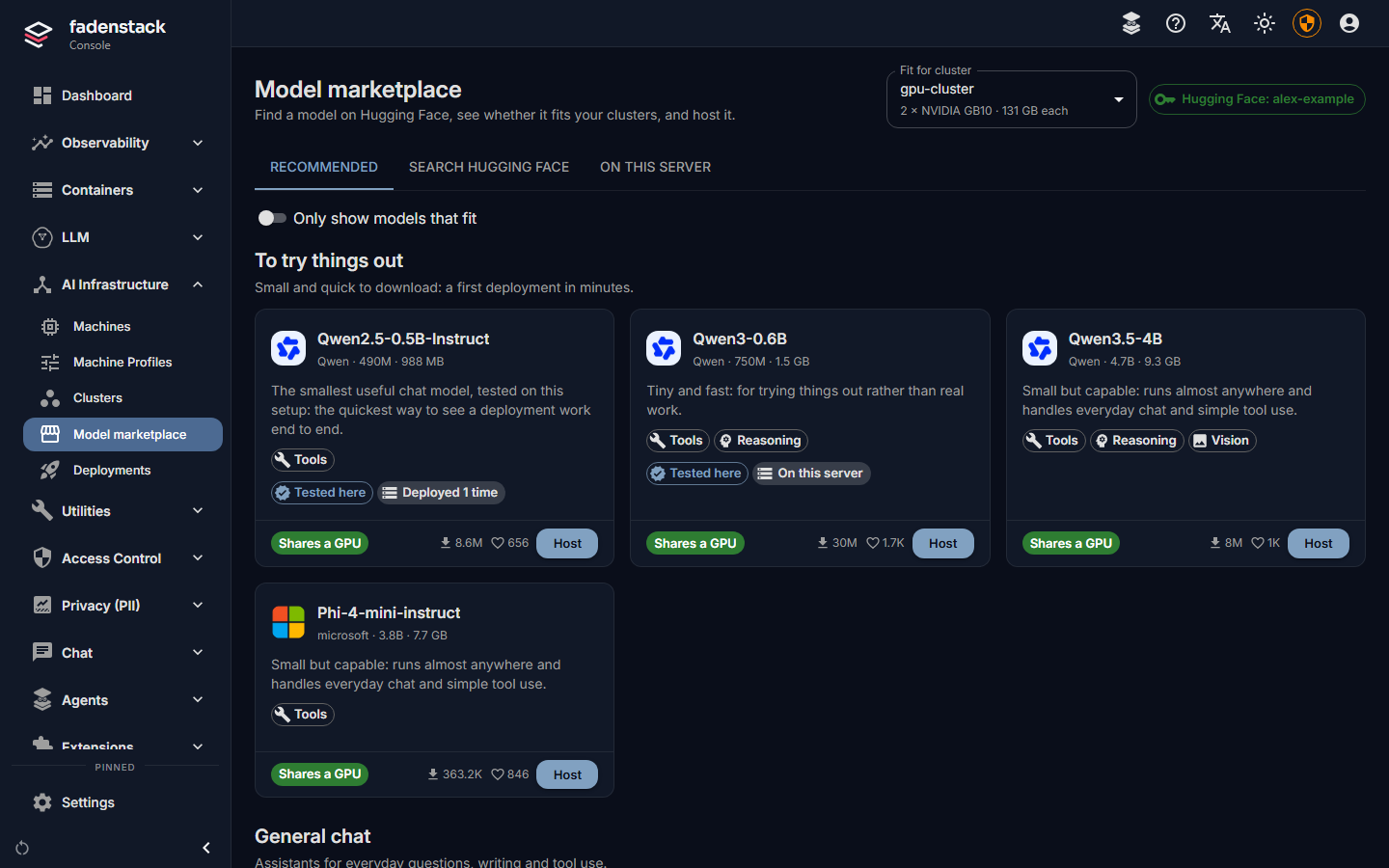
- Recommended: models known to work well, grouped by what they are for: To try things out, General chat, Coding, Reasoning, Vision and Embeddings. A model marked Tested here has been served on the hardware its tooltip names.
- Search Hugging Face: any model on the Hugging Face Hub. Filter by task (Chat, Embeddings,
Vision) and Author (an organisation or user, such as
Qwen), and sort by Trending, Most downloaded, Most liked or Newest. In the search box,*matches any text and?one character:qwen3.8*fp8finds every FP8 build of Qwen3.8. - On this server: the models this server already keeps, and their downloads (see On this server).
Each card says what the model is for (Tools, Reasoning, Vision, Code, Embeddings) and how it fits. Select a card for the details: parameters, context length, precision, licence, its files, and how it fits each of your clusters. Open on Hugging Face shows the full model card.
Models the engine cannot serve are hidden, with a button to show them and the reason: GGUF files (for llama.cpp and Ollama), MLX weights (Apple silicon only), repositories with no weights, and models that are neither chat, vision nor embedding models.
Which models fit
Pick a cluster under Fit for cluster. Each card then says how the model fits it:
| Badge | Meaning |
|---|---|
| Shares a GPU | Small enough that several copies, or other models, share one accelerator. Each copy takes only its share of the memory. |
| Fits on N GPUs | One copy needs N accelerators, split between them. |
| Fits, but not right now | It fits the cluster, but other models are using the memory it needs. |
| Too large | Even every accelerator in the cluster together cannot hold it. |
| Size unknown | Hugging Face does not say how large it is. |
Only show models that fit hides the rest. Fit is an estimate from the model's size, the memory its conversations need and each accelerator's memory. The hosting dialog shows the figures before anything starts.
Before anything is downloaded, the hosting dialog also checks that the cluster's runtime can load the model:
- Cannot run here: the runtime does not know this kind of model. The cluster cannot be chosen, and nothing is downloaded. The model needs a newer runtime on the cluster (see Move a cluster to another runtime).
- May not run: the runtime can read the model but has no implementation of its architecture. It may still work through a generic fallback, which not every model supports.
Host a model
Select Host on the card. The dialog has three steps: Where (the cluster, the size of each copy and how many copies), Engine settings, and Review (the deployment's name and the name people pick in the chat). Deployments describes each step and the deployment's page.
The server downloads the model, copies it to the cluster's machines and starts it. Nothing waits in the dialog: the deployment page shows each step.
Gated models and the Hugging Face token
Public models need no token. Gated models (Llama, Gemma and some Mistral models among them) need a token from a Hugging Face account that has accepted the model's licence. A token also raises download limits.
- Select the Hugging Face chip at the top of the marketplace (or open Settings → General).
- Create a read token on Hugging Face and paste it under Access token.
- Select Check and save.
The chip then shows the account, for example Hugging Face: alex-example.
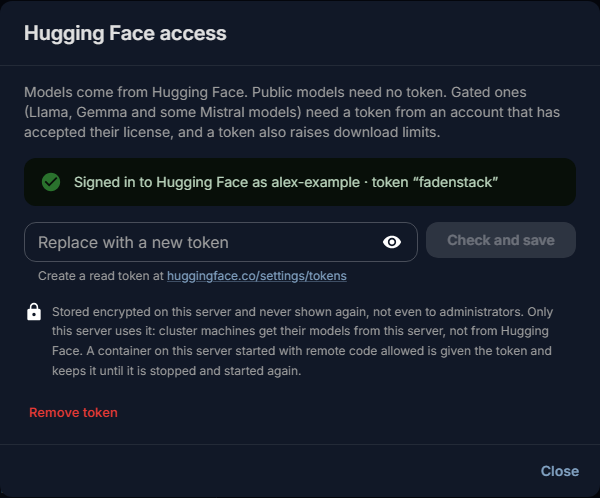
- The server checks the token with Hugging Face before saving it, and refuses one Hugging Face rejects. If Hugging Face cannot be reached, the token is saved and marked as unchecked.
- The token is stored encrypted on the server and never shown again, not even to administrators. If it can also write to Hugging Face, the dialog suggests replacing it with a read-only one.
- Only the server uses it, to search and to download. Cluster machines get their models from the server and never see the token, unless their cluster lets them download models themselves (below).
- Remove token takes it away. Gated models can then no longer be downloaded.
Where the machines get models
By default the server downloads a model once, and each machine of the cluster copies it from the server, so the machines need no internet access. Over a slow link between server and machines, a large model then takes that long twice. A cluster can instead let each machine download models from Hugging Face itself, with the server's token for a gated model: the switch Machines download models themselves on the cluster's page (see Clusters). It needs every machine to reach Hugging Face, and applies to the next model placed on the cluster.
Recipes and suggested settings
When the vLLM project publishes a recipe for a model, its recommended settings are part of the suggestions in the Engine settings step, and the model's details say so (Open the recipe). Settings from the recipe that cannot be used here are listed; optional features from the recipe appear as choices. For other models, the settings are suggested for the model's family. Each suggestion says why it was made. A server without internet access has no recipes and suggests settings by model family.
The engine settings themselves are described under Deployments.
On this server
The On this server tab lists the models this server keeps.
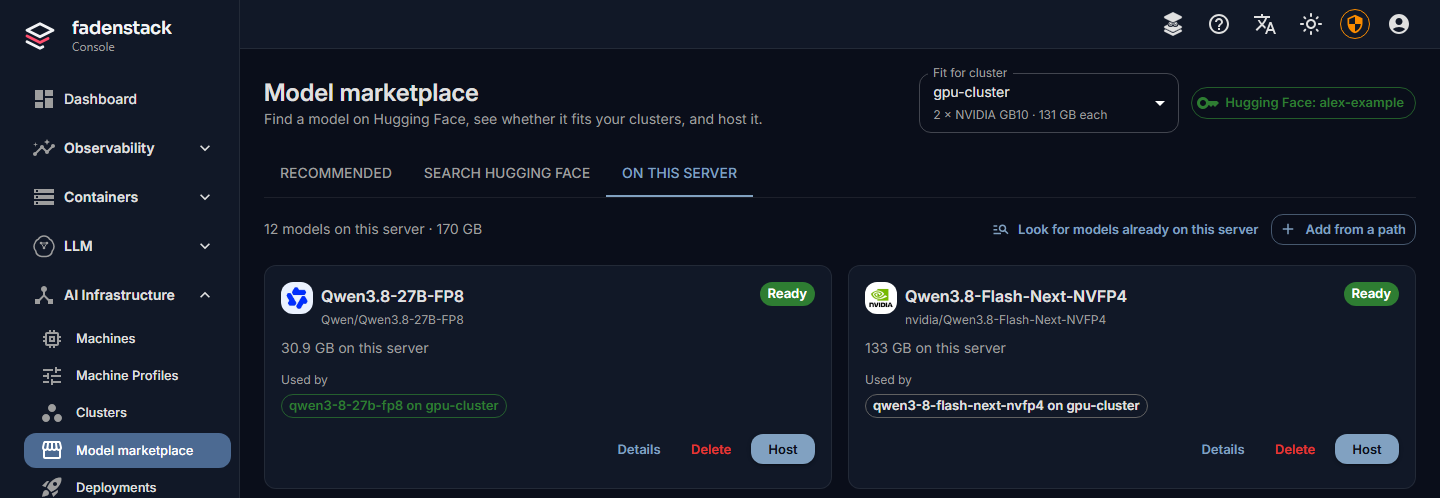
- Downloads run on the server, not in the page: leave the page or close the browser and they carry on. Each shows its progress and can be cancelled (Cancel) or tried again (Try again). While anything downloads, a chip in the header says so on every tab.
- Download to this server, in a model's details, downloads it without hosting it, so it is ready when someone deploys it.
- Add from a path registers a folder on the Fadenstack server that already holds a model's files (its
config.jsonand weights). Fadenstack never deletes those files. - Look for models already on this server picks up models copied into the server's model store by other means.
- Used by lists the deployments that use each model.
- Delete removes a model from the list. A model a deployment still uses cannot be deleted: the dialog names the deployments to remove first. Also delete its files from this server frees the disk space; a model added from a path keeps its files.
Without internet access
A server that cannot reach Hugging Face still shows the recommended list and the models it keeps, with sizes estimated. Search is not available. You can host models already on the server, including models added from a path.
When it does not work
"Hugging Face: token rejected". Hugging Face no longer accepts the stored token: it may have expired or been revoked. Save a new one.
A gated model does not download. The token is missing, or its account has not accepted the model's licence on Hugging Face. Accept it there, then try the download again under On this server.
"This server still uses the default settings master key". The server will not store a token until it has a key of its own. Whoever runs the server sets one (see Installing).
Model downloads failed. The dashboard lists failed downloads of the last day. Open On this server, read the reason, and select Try again. A deployment waiting for the model picks it up once the download finishes.