Your data and privacy
Fadenstack runs on your organisation's own server. This page says what is kept there, who can see it, how personal data is protected when your organisation has set that up, and what leaves your organisation when a model runs at an outside provider.
What is kept, and where
On your organisation's server:
- your account;
- your chats: the messages, the replies and their titles;
- your projects, with their settings;
- the files you attach, and the text read from them;
- your skills;
- usage records: when you used which model, how much text went in and out, and which tools ran. They do not contain what was said.
On a standard installation, the messages, the replies, chat titles, project instructions and the text read from your files are stored encrypted; your administrator can confirm that yours is set up this way. Project names, file names and the attached files themselves are stored as they are. A model's thinking is not saved at all.
On your own computer:
- The browser agent keeps its conversations in your browser, not on the server. Your sign-in is kept there too, not encrypted.
- The Office add-ins keep their conversations on your computer, encrypted, and your sign-in protected by Windows.
Fadenstack keeps your chats until they are deleted. See Deleting.
Who can see what
| Who | What they see |
|---|---|
| You | Your chats, projects, files and skills |
| Colleagues | None of your chats or files. Skills you share with them. The organisation's knowledge base is shared by everyone |
| Administrators, in the console | That a chat exists (who, when, in which project), not its title or messages. Project names. The names, sizes and types of your files, not their content. Your usage. Which tools ran. How often personal data was found, not the data itself. Every skill, including private ones |
The console does not show administrators your conversations. The people who run the server do hold the key the chats are encrypted with, so use the chat as you would your organisation's e-mail: private from colleagues, but within your organisation's IT.
Personal data protection
Your organisation can have Fadenstack find personal data, such as names, e-mail addresses, phone numbers or account numbers, in what you send, and mask it before it reaches a model. Your administrator decides this in a policy: whether it is on at all, for which models, and what is looked for. It is not always on. See Policies and personal data.
When it is on, personal data is masked in one of two ways:
redact: it is replaced by a label such as<PERSON>before the model sees it, and it does not come back. An answer that mentions it shows the label.tokenize_reversible: it is replaced by a placeholder such as[PERSON_1]on the way to the model, and the real value is put back in the answer you see.
If the check cannot run, the policy decides: your message is not sent, it is sent anyway, or it goes to one of your organisation's own models instead.
Detection finds most personal data in English text, not all of it. In German or other languages it often misses names and places. Do not paste anything you are not allowed to share.
See and tighten it for one chat
- Open the tools panel with the wrench beside the message box, and select Privacy.
- The top line says Using tenant defaults (your organisation's policy) or Session override active (this chat has its own settings).
- To protect more in this chat: switch on Cloud egress (for models at outside providers) or Local egress (for your organisation's own models), choose Fail Action, or add a kind of personal data under Detection Settings with Add entity. If your organisation allows it, Mode switches between
redactandtokenize_reversible. - Clear Session Override goes back to your organisation's settings.
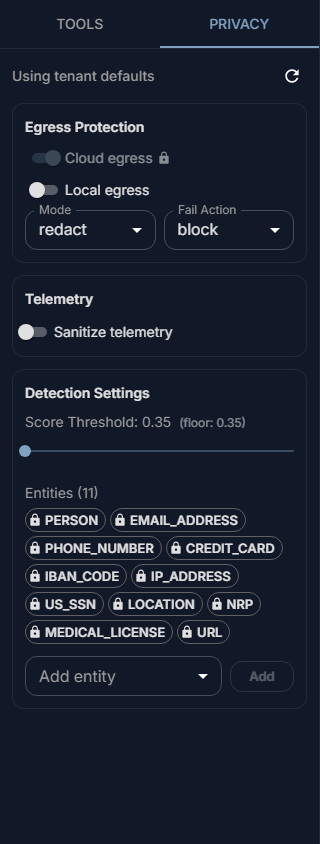
You can only make the protection stricter than your organisation's policy, never looser. Settings the policy enforces show a lock.
In the browser agent and the Office add-ins, a note Personal data protected says how many values were kept from the model, and of which kinds.
Models at outside providers
Your administrator can offer models that run at an outside provider, such as OpenAI or Azure, next to your organisation's own. When you pick one of those, everything the model needs to answer goes to that provider: your message, the earlier messages of the chat, the text of your attached files, project and skill instructions, tool results and knowledge passages. Personal data is masked first if the policy says so. The provider's own terms then apply.
The model list does not always show where a model runs. If it matters for what you write, ask your administrator, or pick a model you know runs inside your organisation. See Remote providers.
Tools and the knowledge base
- A tool your administrator connected receives what the model passes to it, often a search term or text from your conversation. Your administrator decides, per service, how personal data in those calls is handled. See Tools in the chat.
- Everything in the organisation's knowledge base can come up in anyone's chat. Your attached files do not go into it. See Knowledge.
Deleting
- A chat you delete disappears from your list at once. It is not erased from the server: its messages and files stay there until an administrator deletes the chat.
- A project you delete is deleted with all its chats.
- In the browser agent, deleting a chat in Chat history removes it from your browser.
If something must be erased for good, for example personal data you pasted by mistake, ask your administrator.
When it does not work
PII service unavailable and fail_action=block. The personal-data check could not run, and your organisation's policy says not to send messages without it. Try again later; if it keeps happening, tell your administrator.
An answer shows <PERSON> or [PERSON_1] where a name should be. The name was masked before it reached the model. With redact this is expected. With tokenize_reversible the name should come back; if it does not, tell your administrator.
Your admin hasn't allowed changing the PII mode for this chat. Your organisation fixes the mode. The other settings in Privacy may still be open to you.
… is not applied. Choose it again to apply it. The mode you chose earlier did not take effect. Choose it again in Mode.