Installing the server
You install Fadenstack on one Linux server with its command-line tool, faden. One command sets up the
containers, HTTPS, the first administrator and a nightly backup; you then sign in to the console in a browser.
Before you start
- A Linux server that meets the System requirements: x86_64, Docker Engine 24 or later with
Compose v2, Python 3.12 or later with
pipxoruv. - Your user can run Docker without
sudo(it is in thedockergroup). - Ports 80 and 443 are free, or you know which other ports to use.
- The server can reach the internet to pull its images.
- Optional: a DNS name for the server, such as
ai.example.internal, and a certificate for it if you want to use your own (see HTTPS and trust).
Run faden doctor after installing the tool to check the host first.
Install
-
Install the command-line tool:
-
Run the deployment:
-
Answer its questions (below). When it finishes, it prints the addresses the console is reached at and, for a certificate it made, the file to trust.
faden deploy checks Docker, writes the deployment into ~/fadenstack (or the directory you name:
faden deploy /opt/faden), generates .env with random passwords and keys, sizes the services for the host,
pulls the images for the tool's own release, starts everything, and creates the first administrator. The admin
sign-ins of Grafana, RabbitMQ and Langfuse get the first administrator's e-mail and password.
What it asks
| Question | What to answer |
|---|---|
| HTTPS | generate (the default): a certificate made on this server for its names and addresses. own: your certificate and key as PEM files. off: plain HTTP. |
| Other names or addresses | With generate: names the console is reached by that the server does not know itself, such as ai.example.internal. Comma-separated, blank for none. |
| A port to use instead | Only when port 80 or 443 is taken by something else. |
| Admin email | The first administrator's sign-in. |
| Admin password | Leave blank to have one generated. |
| Save to file? | Saves the credentials to ~/fadenstack/.bootstrap-credentials (readable by you only). |
| Back up every night? | Yes (the default) runs faden backup at 03:00 and keeps the last 7. See Backups. |
The credentials are shown once. Store them in a password manager.
Without questions
faden deploy -y asks nothing: HTTPS with a certificate made here, the administrator admin@localhost with a
generated password, saved to ~/fadenstack/.bootstrap-credentials, and the nightly backup on. Store the
credentials somewhere safe, then delete that file.
Choices can be given up front:
faden deploy --tls generate --tls-name ai.example.internal
faden deploy --tls own --tls-cert fullchain.pem --tls-key key.pem
faden deploy --tls off
faden deploy --http-port 8080 --https-port 8443
faden deploy --runtime-images x86_64
--runtime-images says which runtime images the server keeps for the machines: all (the default), none, or
x86_64, aarch64 (NVIDIA DGX Spark), comma-separated. The choice is remembered for upgrades.
The runtime images
At the end, faden deploy pulls the runtime images: the containers the GPU machines run models in. The machines
download them from this server, not from the internet, so the server keeps one per kind of machine. This is the
largest download of the install. If it fails, the services are already running; retry it with:
faden runtime-images            # fetch what this release needs
faden runtime-images --check    # what the server holds, and what is missing
Sign in for the first time
- Open the address
faden deployprinted, such ashttps://ai.example.internal. - With a certificate made on the server, the browser warns that it does not know the issuer. Import
~/fadenstack/tls/ca.crtinto the browser (or the operating system) as a trusted certificate authority, then reload. See HTTPS and trust. - On Sign in to Fadenstack, enter the administrator's Email and Password, and select Sign In.
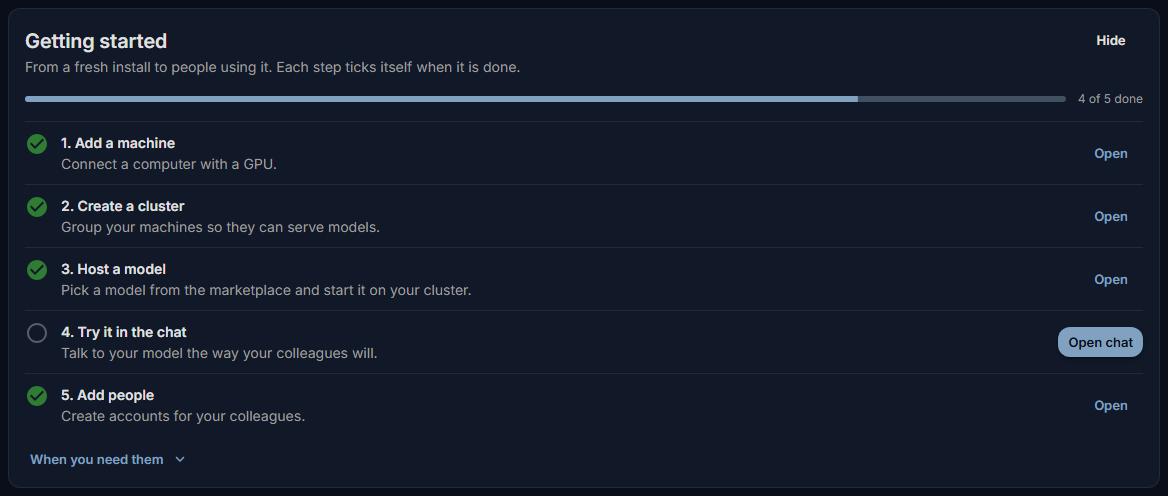
The console opens on the Dashboard, with a Getting started list: add a machine, create a cluster, host a model, try it in the chat, add people. Each step ticks itself when it is done.
Next: add the GPU machines.
Where things are
| Path | What it is |
|---|---|
~/fadenstack/ |
The deployment: compose file, .env, service configuration |
~/fadenstack/.env |
Every password, key and setting. Keep it private, and keep a copy with your backups |
~/fadenstack/tls/, ~/fadenstack/tls-ca/ |
The served certificate, and the server's own certificate authority with its key |
~/fadenstack/backups/ |
Backups |
~/fadenstack/logs/ |
The log of the daily certificate renewal (the nightly backup logs to ~/fadenstack/backups/backup.log) |
~/.config/faden/faden.yaml |
The tool's own settings: where the install is, which modules are on |
The data lives in Docker volumes named fadenstack_*, such as fadenstack_pg_data.
Settings you change belong in .env. The other deployment files, such as nginx/nginx.conf, are replaced by the
next upgrade.
Optional modules
Three modules can be added to the core services: pii (finds and masks personal data), mcp (tool servers for
chats and agents) and skills (saved instructions). They need more memory (see
System requirements).
faden module disable pii, then faden down and faden up, takes one away again.
Everyday commands
| Command | What it does |
|---|---|
faden status |
Every service, running or not, and healthy where it has a check |
faden logs -f faden-backend |
Follow one service's log (all services without a name) |
faden up / faden down |
Start or stop the services; the data stays |
faden doctor |
Check the host, the ports and the certificate |
faden config show |
Where the install is and how the tool is set up |
faden admin reset-password --email [email protected] |
Set a new password for a user who cannot sign in |
faden --help |
Every command; faden <command> --help for its options |
Removing Fadenstack
faden down stops and removes the containers and keeps the data volumes, so faden up brings everything back.
Warning
faden down --volumes also deletes the data volumes: the database, every chat, the model store. It cannot be
undone. Take a backup first and copy it off the server.
When it does not work
Docker is not available or Docker daemon is not running. Install Docker Engine with the Compose plugin,
start it, and make sure your user is in the docker group (log out and in again after adding it).
HTTP port 80 is in use by something else. Another program holds the port. Free it, or run
faden deploy --http-port 8080 --https-port 8443. faden doctor lists every port the install publishes and whether
something else holds it.
Backend did not become healthy in time — skipping admin setup. The services started but the console API
did not answer in time. Check faden status and faden logs faden-backend, fix what they show, then run
faden deploy again: it keeps the .env and creates the administrator.
Some images failed to pull. The server could not reach a registry. Check its internet access and proxy,
then run faden deploy again.
The browser refuses the certificate. The server's certificate authority is not trusted on that computer yet.
Import ~/fadenstack/tls/ca.crt, or use a certificate from your own issuer (see HTTPS and trust).
The console says "This server still uses the default settings master key". The key that seals stored secrets
(the Hugging Face token, among others) is still the default. faden deploy writes a random one into .env; an
install started some other way may lack it. Set FADEN_BACKEND_SETTINGS_MASTER_KEY in ~/fadenstack/.env to a
long random value (for example the output of openssl rand -base64 48), then run faden up. Secrets stored
under the old key have to be entered again.