Deployments
A deployment is one model running on one of your clusters, in one or more copies. This page covers hosting a model, reading its page, changing how many copies run and how the engine runs them, and what its states and messages mean.
Before you start
- A cluster that is running (see Clusters).
- A model: from the model marketplace, or one this server already keeps.
Host a model
Start from any of these; they open the same dialog:
- Host on a model's card in AI Infrastructure → Model marketplace;
- Deploy a model on a cluster's page;
- Deploy a model under AI Infrastructure → Deployments (the dialog then starts with a Model step: pick one of the models this server keeps).
Then:
-
Where. Pick the Cluster and the Size of each copy: a share of one accelerator, one accelerator, or several (the copy is then split across them). Set how many Copies run. The fit check picks a size and says how many copies the cluster has room for. Select Next.
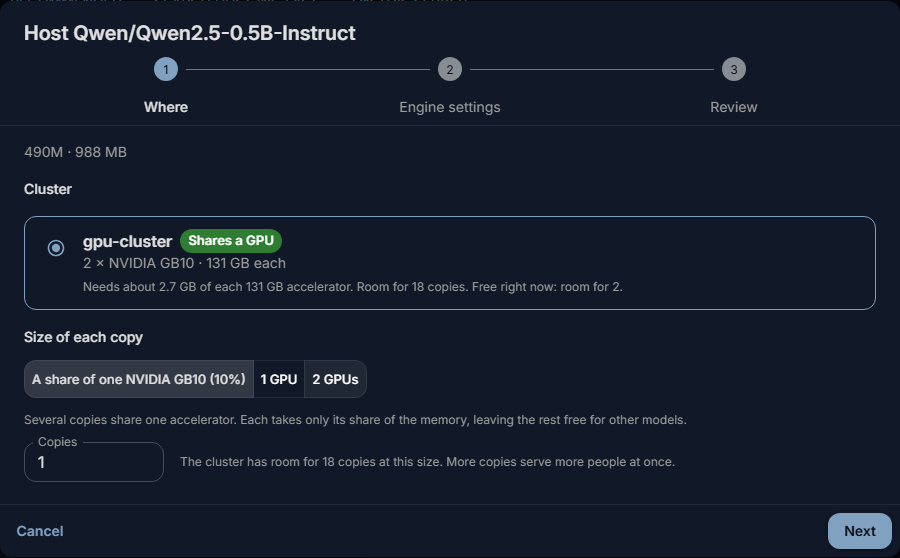
-
Engine settings. The suggested settings suit most uses (see Engine settings). Change the longest conversation here if people need longer ones. Select Next.
- Review. Check the Deployment name (lowercase letters, digits and dashes, shown in lists and logs) and Offer in chat as, the name people pick in the chat and use at the API. Revision (optional) pins a branch, tag or commit on Hugging Face. Select Host.
The server downloads the model if it does not have it yet, copies it to the machines and starts the copies. Nothing waits in the dialog: Deployments and the deployment's page show how far it got. If not every copy fits in the memory free right now, the dialog says so; the rest start when other models make room.
The deployment's page
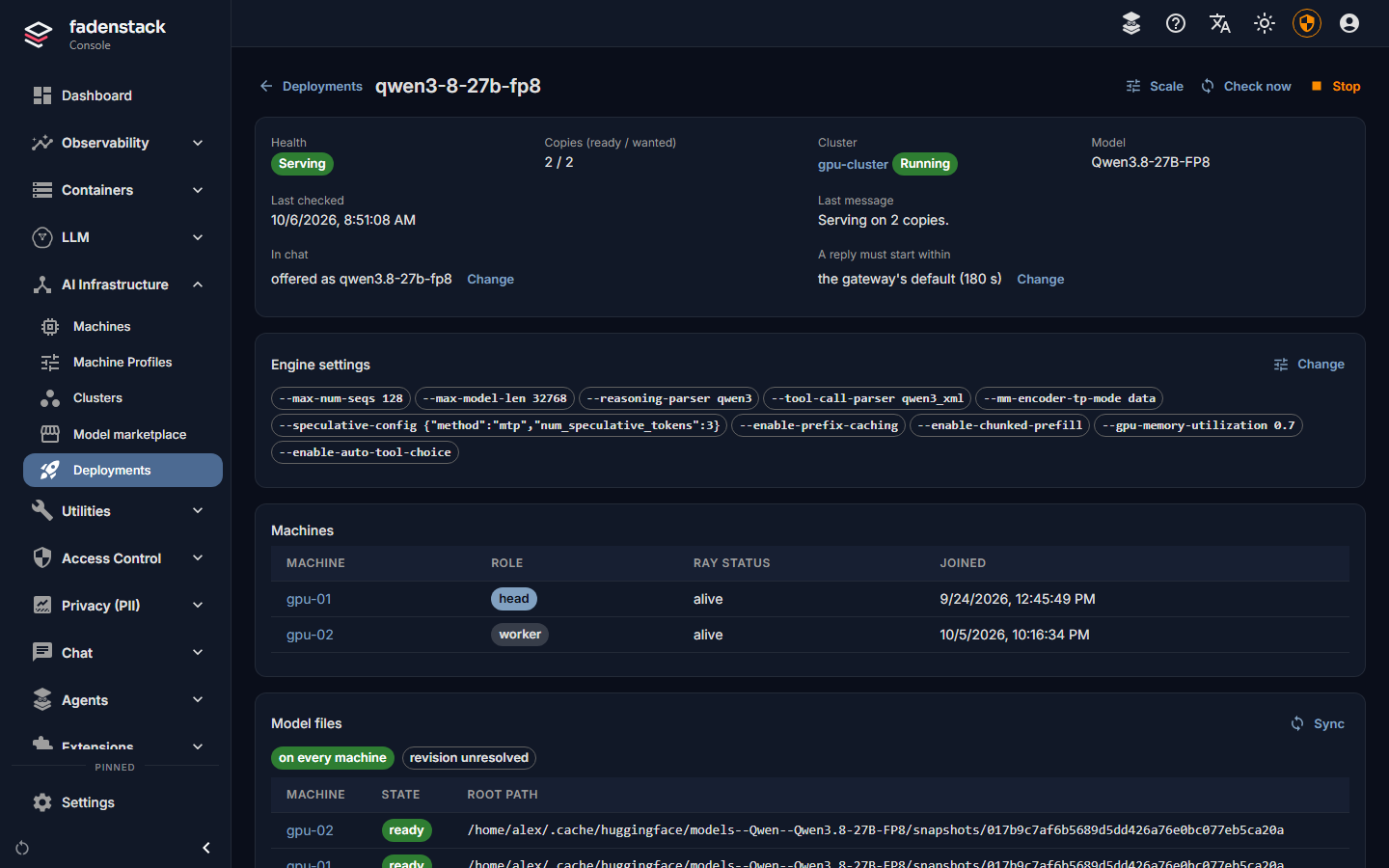
Open AI Infrastructure → Deployments and select a deployment. The page shows:
- Health: the deployment's state (see States), and Copies (ready / wanted).
- Cluster and Model, Last checked and Last message: what the deployment last reported, in words. Check now looks at it at once instead of at the next regular check.
- In chat: the name it is offered under, or "not offered: endpoint only".
- A reply must start within: the reply wait (see Reply wait).
- Engine settings: what was changed from the engine's defaults.
- Machines: the cluster's machines and their state. Which machine runs which copy is not reported.
- Model files: whether the model is on every machine, or on how many, and a Sync button.
- Endpoints: the address the model answers on, once the first copy serves.
- Figures measured at the gateway over the last minutes: Requests, Generation speed, Time to first token, Request latency and Failed; and further down, the figures Reported by the engine.
- Logs: one log from every machine of the cluster, with two streams: Model serving (copies starting, getting ready, stopping) and Engine (vLLM) (what the engine printed, including why a start failed). Filter by level, stream and machine, or search; copy or download the lines the filters show.
Offer it in the chat
A deployment is offered in the chat only under a name someone chose. The hosting dialog proposes one. To set or change it:
- On the deployment's page, select Offer in chat (or Change beside In chat).
- Enter the name under Offer in chat as, or clear it to serve the model only at its endpoint.
- Select Save.
The model keeps running; only its name changes. It appears in the chat within a minute or two. Deployments that share a name share the traffic: each request goes to one of them that is healthy.
Reply wait
A busy model keeps new requests in its queue until it has room, and sends nothing meanwhile. After the reply wait, the request fails and the person can try it again. It is 180 seconds unless you change it:
- Select Change beside A reply must start within.
- Enter 10 to 1800 seconds, or leave it empty for the gateway's default.
- Select Save.
The model keeps running while this changes. If replies time out often, the model needs more room rather than more patience: more copies, or more memory per copy.
Scale it
Scale on the deployment's page sets two things:
- Copies: how many copies run. More copies serve more requests at once.
- Accelerators per copy (for a model that runs on one accelerator): 1 is a whole accelerator. Less lets copies share one; more than 0.5 keeps each copy on an accelerator of its own. The engine takes the same share of the accelerator's memory (a whole one: 80 %), and the dialog shows how much that is.
Select Apply.
| You change | What happens |
|---|---|
| The number of copies | The copies that run keep serving. New copies start beside them; surplus copies finish their requests and stop. The deployment stays Serving, and Last message says what is left, for example "Serving on 1 of 2 copies; 1 more starting." |
| Accelerators per copy | Every copy restarts with its new share. The model is unavailable until they are back. |
The dialog counts the cluster's accelerators: "Each copy uses 1 accelerator. This cluster has 2, so up to 2 copies fit when nothing else is running on it." Asked for more, the copies that fit start and serve, and the page says why the rest cannot ("… 1 cannot start: each copy needs 1 accelerator, and this cluster has 2, so 2 fit. Scale to 2, or add a machine to the cluster.").
A copy also needs memory
A copy needs both its share of an accelerator and the accelerator memory its engine asks for. When a machine has the share free but another model or program holds the memory, the new copy keeps trying to start: Last message stays at "Serving on 1 of 2 copies; 1 more starting.", and the Engine (vLLM) log shows the engine's error about memory. The copies already running keep serving. Scale back down, lower the accelerator share or the engine's memory share (both restart every copy), stop another deployment on that machine, or add a machine to the cluster.
A deployment set up through the API to scale itself between a lowest and a highest number of copies restarts every copy when those bounds change. Scale in the console always sets a fixed number.
A deployment that was started by an earlier Fadenstack release restarts every copy once, the first time its number of copies changes after the upgrade. From then on, changing the number keeps the running copies serving. This needs recent agents on the cluster's machines and a recent runtime; without them, every change restarts every copy.
Engine settings
The engine (vLLM) runs the model. Engine settings → Change on the deployment's page opens the same editor as the hosting dialog:
- Values marked suggested come from the vLLM project's recipe for the model when there is one, otherwise from rules for the model's family. Each says why it was suggested.
- Tuned for: Balanced, Long documents, Many users or Low memory. A preset changes only the settings it is about.
- Context and memory: Longest conversation (prompt and answer together), Share of the accelerator's memory, 8-bit context cache.
- Throughput: Requests at once, Reuse shared prompt starts, Split long prompts.
- What it can do: Tool calling and its Format, Show its thinking separately, Serve embeddings. Without tool calling the model answers in text only, and the tools offered in the chat (MCP tools, the knowledge base) are not used.
- Compatibility: Skip graph capture, Run the model's own code. Turn the latter on only for publishers you trust: it runs Python from the model's repository on your machines.
- All vLLM settings: every setting of the engine version the cluster runs, searchable, and Other flags, as text for anything else. Anything that could escape the command is refused.
- A preview of the settings, shown as vLLM flags.
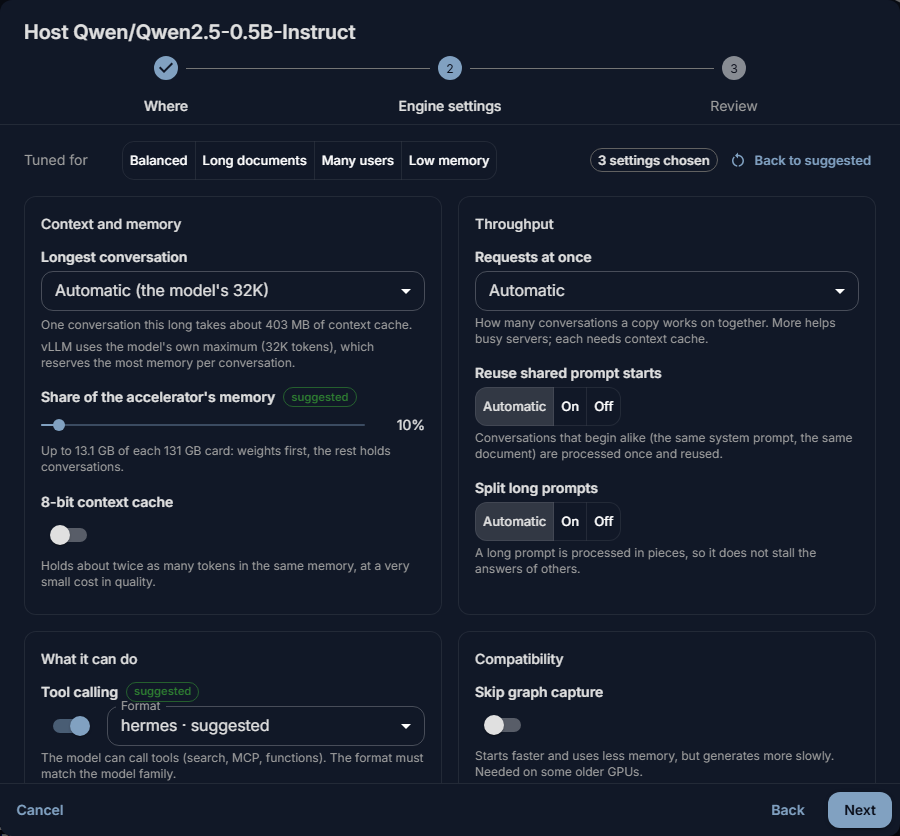
Warnings appear before a setting that will not start: a conversation longer than the model supports or than fits in memory, a memory share above 95 %, a tool format with tool calling off, or the model's own code.
The memory share can be lowered below the share of the accelerator set under Scale, never raised above it; a higher value is capped, and the dialog says so.
Warning
Save and restart restarts every copy with the new settings. The model is unavailable until they are back up. If a copy does not start, the page says why, and you can change the settings back.
Stop, start and delete
- Stop on the deployment's page takes the copies off the machines and frees their accelerators; a large model can take a few minutes. The deployment keeps its settings. Start loads it again.
- Delete in the row's actions under Deployments stops it and removes it from its cluster. The model stays on this server under Model marketplace → On this server, so it can be hosted again without a download.
States
| State | Meaning |
|---|---|
| Queued | Waiting to be applied, for example until its cluster is running. |
| Copying the model | The server downloads the model if needed, then copies it to the machines. |
| Starting | The copies are starting and loading the model. |
| Serving | At least one copy serves requests. |
| Degraded | Some copies serve, others failed to start or are unhealthy. The model is still in use. |
| Stopping, Stopped | Being stopped, or stopped. |
| Failed | It did not start. Last message and the log say why. |
| Removed | Deleted. |
When it does not work
"Start failed: … Not tried again: this error comes back on every attempt." The engine stopped with an error that would return on every try, such as weights it cannot load or a setting it rejects. Select Show the errors to see the lines in the log. Most often the model does not fit in the accelerator's memory, or it needs a number format the card does not support. Fix the cause (for memory: a shorter Longest conversation, or the 8-bit context cache), then save the change or select Check now: it starts over.
"A start failed: … Ray is trying again." An error that can pass, such as memory that is not free yet, or a timeout. The cluster keeps trying by itself.
"1 of 2 copies serve; the others failed to start: …" (Degraded). The model serves on fewer copies than asked for. Read the reason, then scale down, free memory, or fix the setting it names.
"… Ray has not found room for it yet -- another deployment may be using the accelerators it needs." Stop or scale down another deployment on the cluster, or add a machine.
The deployment waits while the server downloads the model, then shows a download error. For example a gated model without a Hugging Face token, or a misspelt repository. Fix it (see Models) and select Try again under Model marketplace → On this server. The deployment picks the model up once it is there.
It serves, but it is not in the chat. It has no chat name: In chat says "not offered: endpoint only". Select Offer in chat.
Replies fail with "The model did not start its reply within … s; it may be busy." The model was busy for longer than the reply wait. Add copies, give each copy more memory, or raise the wait.
More on failures and logs: Failures and logs.