Content marking
The EU AI Act (Art. 50(2)) asks providers of AI systems that generate text, pictures, audio or video to mark what they generate in a machine-readable way, so that it can be detected as AI-generated. The Provenance module does that for what your installation's models produce, and lets people check content for those marks. It is on from the start and needs no setup.
How people check a text, a picture or a file is on Checking content.
What is marked
| Content | What it gets |
|---|---|
| Pictures that image models return | An invisible watermark, picture metadata and signed content credentials (see Pictures) |
| Every complete text answer, of every model | A signed receipt (see Text answers) |
| Text answers of your own models | Also an invisible text watermark, on a runtime that has it |
| What the agents write into documents, mails, web forms and files | A mark there, and a signed record of each placement (see What the agents write) |
Ask people to keep the marks
The marks are only useful while they stay in place. Tell the people who use generated content not to remove them: not to strip a picture's metadata or content credentials, and not to edit a text just to get rid of its watermark. The EU's Code of Practice on marking asks providers to say this.
The provenance module's licence (section 5.5) asks the same of your organisation, and that you put it in the terms of use for your own users. For example: "Do not remove, alter or hide the marks that show content as generated by AI (watermarks, content credentials, metadata), and do not help others to."
What stays with your organisation
Fadenstack marks what its models generate, as Art. 50(2) asks, and offers the check that goes with it. Other duties of Art. 50 lie with whoever uses the content or offers an AI system, and the marks do not meet them:
- Visible labels (Art. 50(4)). When your organisation publishes a deep fake (a picture, audio or video that shows real people, objects, places or events in a way that would falsely appear authentic) or an AI-generated text meant to inform the public on matters of public interest, it must say so where people see it. A machine-readable mark does not do that. A text needs no label when a person reviewed it and someone holds editorial responsibility for publishing it; for evidently artistic, satirical or fictional work, the label may be given in a way that does not spoil the work. The EU offers free icons for such labels.
- Saying that people talk to an AI (Art. 50(1)). The chat says so under the message box ("Answers are generated by AI and can be wrong."). Your own applications and agents that talk to people must say it too, at the latest when they first do (Art. 50(5)).
- Keeping the marks. Ask your users not to remove them, in your terms of use for them (see the tip above).
- Agents you build. An organisation that builds an agent on the Fadenstack SDKs and uses or offers it under its own name is, in our reading of the Commission's guidelines, the provider of that agent, with the duties of Art. 50 for what it generates. The SDKs mark what an agent writes and keep its records; see the developers' documentation.
Art. 50 applies from 2 August 2026; AI systems placed on the market before then have until 2 December 2026. This page says what Fadenstack does; it is not legal advice, and whether your use needs more depends on it.
Pictures
Image generation is off in this version
This version makes no pictures, and refuses a chat model's picture (see Image generation is off): no picture is marked. What follows applies again when image generation returns.
Every picture that an image model returns through Fadenstack is marked before it leaves:
- an invisible watermark (TrustMark) in the pixels, which survives re-encoding and screenshots in most cases;
- picture metadata (IPTC) that names it "trained algorithmic media";
- content credentials (a C2PA manifest), signed with a certificate from your installation's own certificate authority.
No unmarked picture leaves
If the marking engine cannot mark a picture, the picture is not delivered: the request fails with 503
provenance_unavailable and "The picture could not be marked as AI-generated, so it was not returned."
Text answers are not held back: while the engine is down, they go out without a receipt.
Text answers
The receipt. Every complete answer gets a signed receipt: a record that a model of this installation produced a text with this hash. The marking engine never stores the text, only a keyed hash of it. Checking a text later finds its receipt, even when line breaks and spacing were changed.
The fingerprint. An answer of 25 words or more also leaves a fingerprint with its receipt: keyed hashes of some of its five-word phrases, never the text. It finds an edited copy of the answer: words taken out, sentences added, passages moved. A check says how much of the text comes from the answer. When most of it does, the result is Marked as AI-generated; when only part of it does (a quotation in a person's own text), the check names the answer and the result is Inconclusive. The fingerprint works for every model, remote ones too, and backs up the watermark where the watermark is weak. Neither survives rewording or translation.
The text watermark. Answers of your own models also carry an invisible watermark: a pattern in the model's choice of words, keyed with your installation's secret watermark key. It is a probability, not a kept mark: on 0.7.1 it was found in about a third of the texts of 200 to 399 tokens, three quarters of 400 to 999 and all from 1,000. A paste or light rewording can remove it; so can heavy editing, translation or paraphrase. A text that mostly restates what the model was given (a summary of a mail, a rewrite of a paragraph, names and figures taken from a document) carries little of it, as the model has few words of its own to choose: such a text is found by its receipt, and what the agents write also by the record they keep with it.
These answers carry no text watermark, and their receipt records which of these applies:
- short answers, under 200 tokens;
- answers asked for with temperature 0 (greedy decoding: the model always takes its most likely word);
- answers of a model on a runtime without the watermark (see The runtime decides);
- answers of remote providers, unless an administrator recorded that the provider marks its text itself: no answer says whether it was marked (see Models that cannot mark their answers);
- answers of a deployment for which a superuser switched the watermark off.
The same question, a new answer
With the text watermark, the model's choice of words is keyed, so exactly the same request would get exactly
the same answer. Fadenstack therefore varies each request to a watermarking model invisibly: trying again
gives a new answer, as it does without the watermark, and a request with a seed gets the same answer
for the same seed. Several answers to one request (n) come only without streaming.
The runtime decides
Whether a chat model watermarks its answers depends on its cluster's runtime. On a cluster's Runtime card, a runtime with vLLM 0.30 or later has the watermark: for GB10 machines that is the runtime with vLLM 0.31, and the x86_64 runtime with vLLM 0.31 is meant to have it too, but this has not been measured there. The GB10 runtime with vLLM 0.29 and the x86_64 one with vLLM 0.26 have none.
- A model picks up the watermark the next time it starts. Switching a cluster's runtime restarts the cluster and its models (see Clusters).
- A chat model that watermarks starts without speculative decoding (MTP, EAGLE, n-gram), even when its deployment asks for it. With MTP, answers came about 70 % faster, but the watermark was found in only a third of long answers at best and in none of the short ones, as the drafts the model accepts carry little of it. Fadenstack allows speculative decoding again only for configurations measured to keep the watermark; none has been yet.
- A superuser can switch the watermark off for one deployment with the engine setting
watermark_config: false(see Engine settings). The receipts of its answers then say that they carry none.
Models that cannot mark their answers
With content marking on, a chat goes only to a model whose answers carry a mark: a model on a runtime with the
watermark, or a remote provider for which an administrator recorded that it marks its text itself. Any other
chat is refused with the error unmarked_endpoint, before anything is sent to the model. Pictures are always
marked by Fadenstack itself; embeddings and reranking are not affected.
For a model that is refused, an administrator chooses one of these, on the provider's card in the Data Residency Map, under Content marking:
- Run it on a runtime with the watermark (see The runtime decides). Nothing needs to be set.
- The provider marks its models' text itself: for a remote API, with a link to where the provider says so and the date you read it. The receipts of its answers then say that the provider marked them. Check it for the models you use: Anthropic marks its newer models, OpenAI only when an account switches it on, and no answer says whether it was marked.
- Allow answers without a mark, with a reason. Its answers then go out with a notice: the chat shows one
under the answer, and the API sends the header
x-faden-unmarked: allowed-by-administrator(and the eventfaden.unmarked). In the browser agent and the Office add-ins, people see the notice only if they switch on Tell me when an answer carries no AI mark in the panel's settings (see Checking content). The choice is recorded with your name and the time, and in the audit log.
After the upgrade to 0.5.0
Chats with remote providers, and with models on runtimes without the watermark, are refused until one of the three is done. Switch x86_64 and GB10 clusters to the runtime with vLLM 0.31, and decide for each remote provider.
Work that is not marked. The AI Act does not ask for marks on text that only edits a person's text (a
correction, a translation), nor on code. A client whose user's roles give the permission chat.purpose:declare
says so per request, with "faden": {"purpose": "correction"} (or translation, code) in the request
body; the model never sees it. Such a request is not refused, and its receipt says exempt-edit. Only the
administrator's role has this permission; give it to others with a role of your own (see
Users, groups and roles).
What the agents write
The Office add-ins, the Chrome extension and the Nextcloud app mark what they write into documents, mails, web forms and files, each in the way its host allows: in document properties or custom XML, in mail headers, in HTML attributes, in file metadata, or in the front matter of a Markdown file. The installation keeps the signed record of each placement.
These marks are a second signal beside the text's own watermark: a mail program or a web form can drop an HTML attribute on paste or save, and a reader copying the plain text leaves it behind.
Who can check content
Everyone signed in can check content, from the chat's avatar menu (Check content); you also find it in the
console under Utilities → Check content. It needs the permission provenance:check, which every built-in
role has. Give it to roles of your own whose people should check too.
The public check page
People without an account can check pictures and files on the public check page, at /check of your
installation (for example https://ai.example.internal/check). It is on from the start: pictures and files can
reach the public, and for them the AI Act's code of practice asks for detection anyone can use. People outside
can only use it where they can reach your installation.
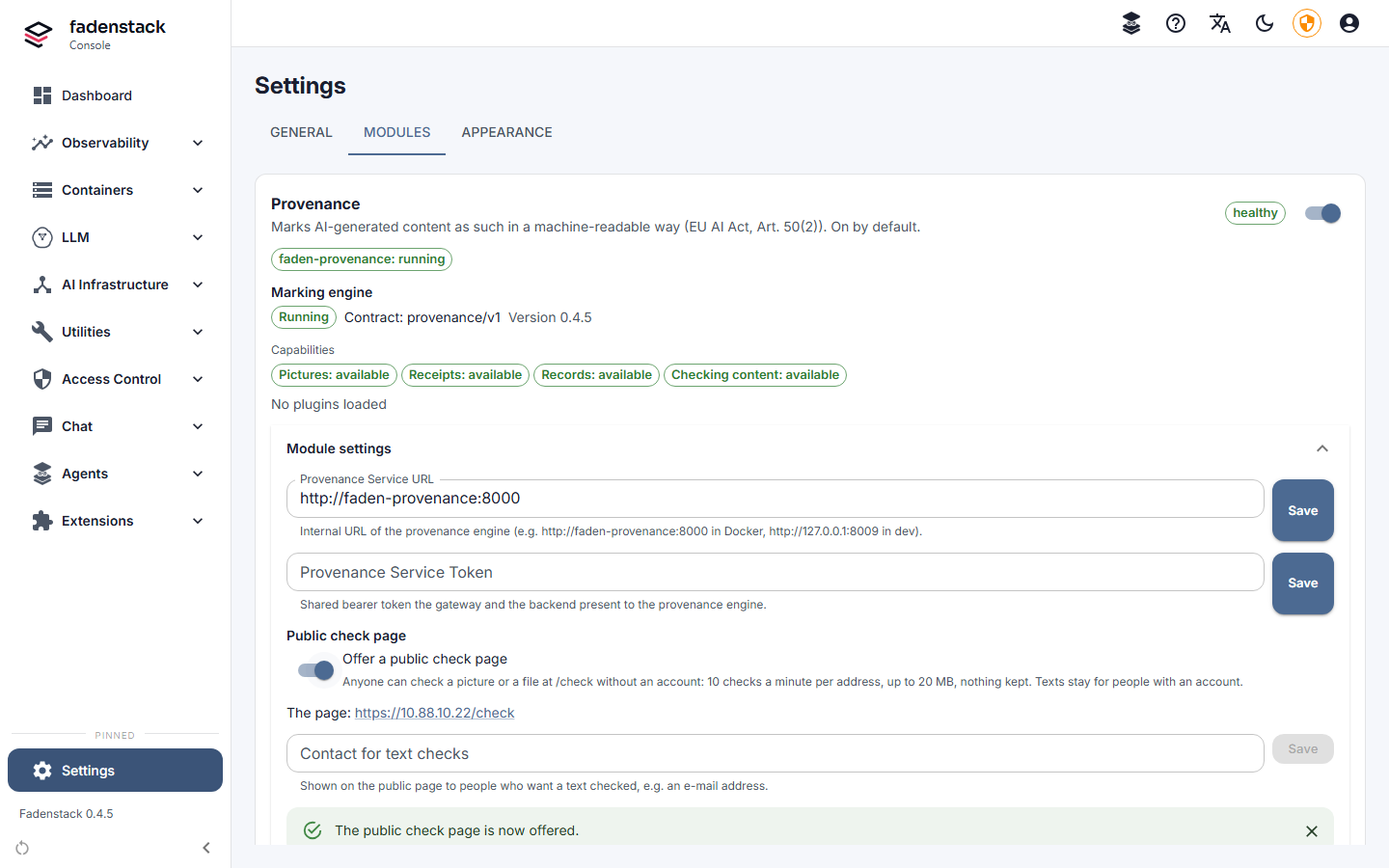
- Open Settings → Modules and, on the Provenance card, open Module settings.
- Enter the Contact for text checks, for example
[email protected], and select Save. - To take the page offline, switch off Offer a public check page under Public check page.
The page checks pictures and files up to 20 MB, 10 checks a minute per address, and keeps nothing. Texts are refused there, and the page names your contact instead: texts are checked only for people with an account (the AI Act's code of practice allows limiting who can check for text watermarks). With the page on, the certificates needed to check a signed result offline are published too.
Switch it off, or on again
- Open Settings → Modules.
- On the Provenance card, select Stop.
- Read what stops being marked, tick I understand that generated content will no longer be marked as AI-generated. and select Switch off.
It is recorded in the audit log with your name and the time. Start on the same card switches it on again.
On the server, faden module disable provenance does the same: it explains what stops being marked, asks to
confirm and records who switched it off and when; faden up then applies it, and
faden module enable provenance switches it on again. Upgrades keep the module as it was, on or off.
What stops while it is off
Pictures leave unmarked, answers get no receipt, models that start from then on start without the text watermark, and Check content disappears from the chat and the console. What was recorded before is kept.
Records
Receipts with their fingerprints, the records of placements and the agents' reports about them hold hashes and ids, never the content. They are kept as long as they are needed. Every backup includes them, with the provenance database and its keys, and a restore or an upgrade keeps them (see Backups).
Keys
The keys live on the server, in .env, and the faden command manages them:
| Key | What it is for | How it changes |
|---|---|---|
| The signing key and its certificate | Sign the content credentials, the receipts, the records and the signed results of checks | faden up and faden upgrade issue a new one when fewer than 30 days are left; faden secrets rotate gives a new one at any time |
| The hash keys | Key the hashes that receipts and records hold | Kept in versions |
| The text watermark keys | Key the text watermark | Kept in versions |
Rotating a versioned key adds a version, and every older one stays, so content marked earlier can still be
checked. A running model keeps its watermark key until it next starts. faden secrets rotate --only provenance
rotates these keys alone; how a rotation runs is on Rotating the keys.
When it does not work
| You see | What to do |
|---|---|
A picture request fails with 503 provenance_unavailable |
The marking engine could not mark the picture. Look at Marking engine on the Provenance card under Settings → Modules. Whoever runs the server checks faden status and faden logs faden-provenance. |
| Marking engine says Not running | Content cannot be marked while the engine is not running. Whoever runs the server starts it again (faden up). |
| The engine refused the service token | The backend and the engine must use the same service token. Tell whoever runs the server. |
| Content cannot be checked yet: the marking engine has no keys set up. | The keys are missing in .env. faden up makes what is missing. |
| A model's answers carry no text watermark | Go through the list under Text answers: the runtime, whether the model has restarted since, the length of the answers, the temperature, and whether they restate a given text. |